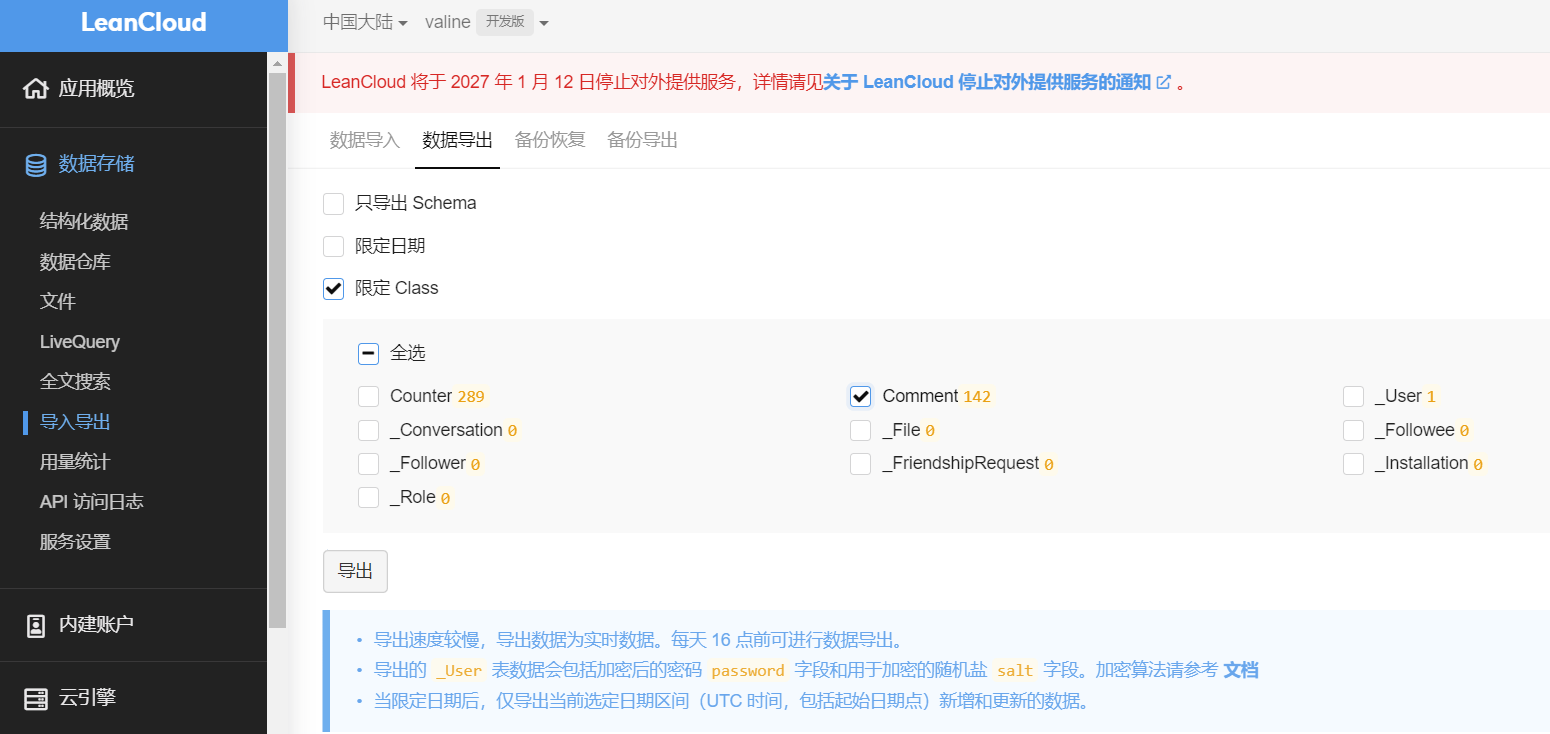
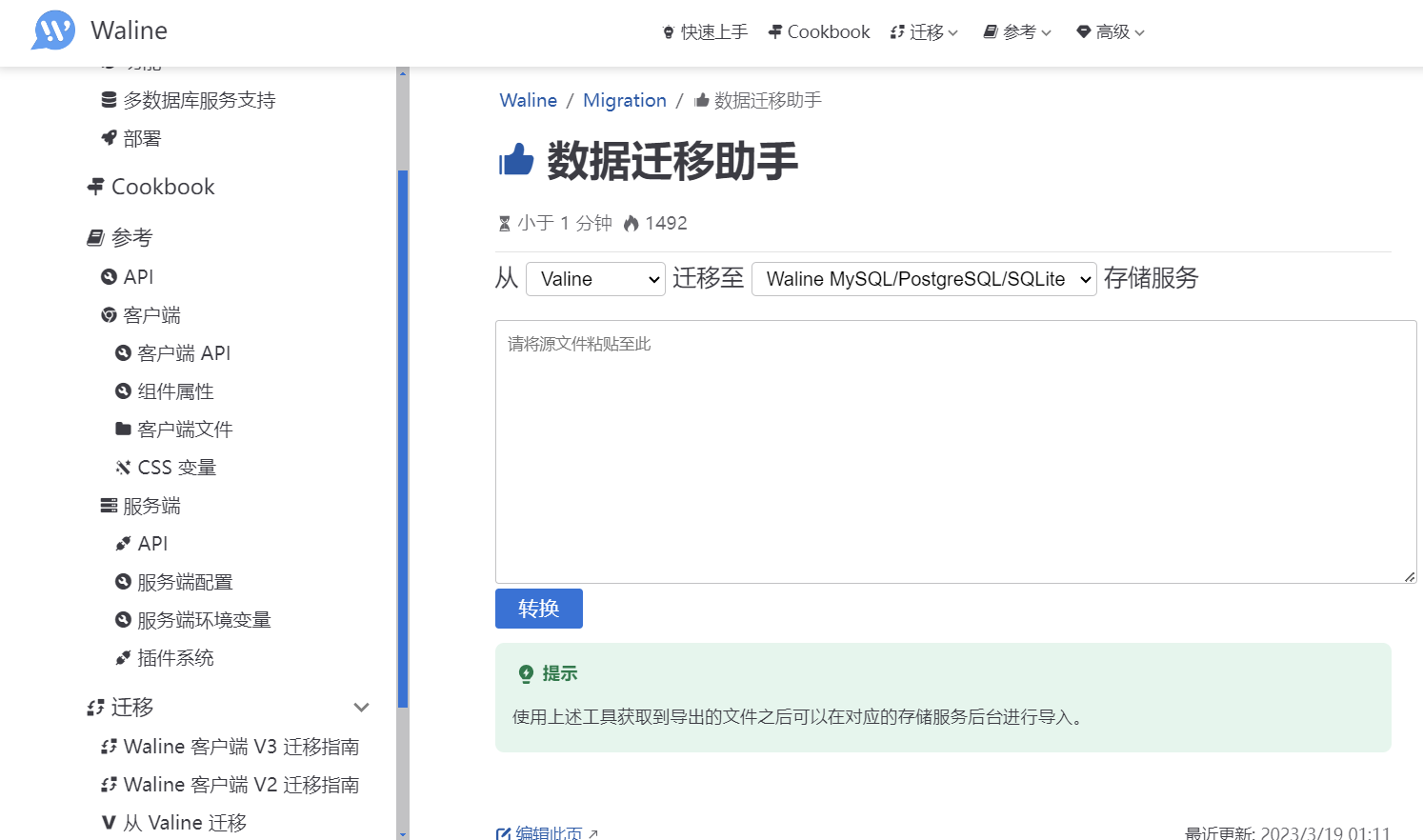
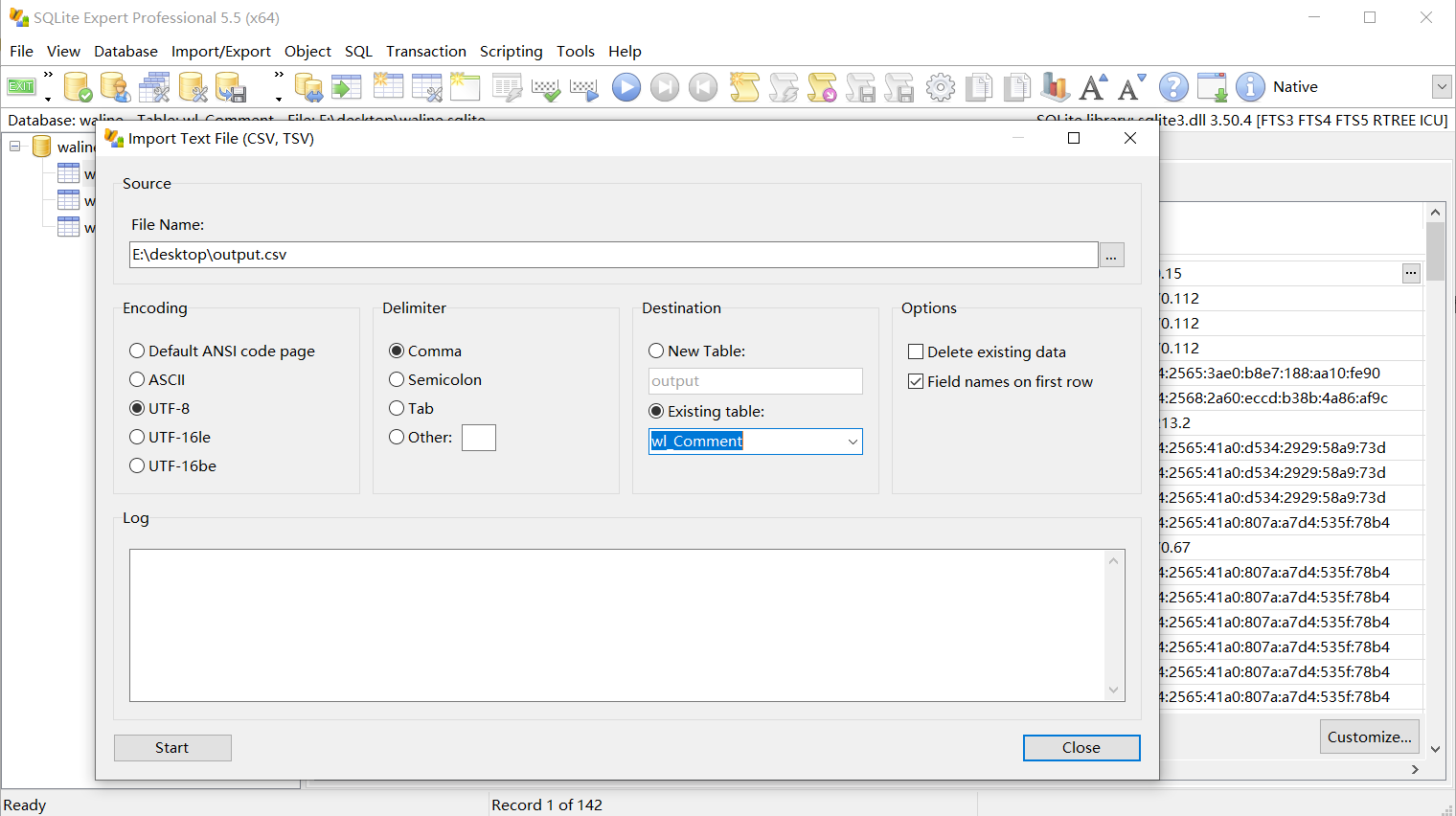
1
2
3
4
5
6
7
8
9
10
11
12
13
14
15
16
17
18
19
20
21
22
23
24
25
26
27
28
29
30
31
32
33
34
35
36
37
38
39
40
41
42
43
44
45
46
47
48
49
50
51
52
53
54
55
56
57
58
59
60
61
62
63
64
65
66
67
68
69
70
71
72
73
74
75
76
77
78
79
80
81
82
83
84
85
86
87
88
89
90
91
92
93
94
95
96
97
98
99
100
101
102
103
104
105
106
107
108
109
110
111
112
113
114
115
116
117
118
119
120
121
122
123
124
125
126
127
128
129
130
131
132
133
134
135
136
137
138
139
140
141
142
143
144
145
146
147
148
149
150
151
152
153
154
155
156
157
158
159
160
161
162
163
164
165
166
167
168
169
170
171
172
173
174
175
176
177
178
179
180
181
182
183
184
185
186
187
188
189
190
191
192
193
194
195
196
197
198
199
200
201
202
203
204
205
206
207
208
209
210
|
import sqlite3
import csv
import os
import argparse
from pathlib import Path
def detect_delimiter(file_path, sample_size=5):
"""自动检测CSV文件的分隔符"""
with open(file_path, 'r', encoding='utf-8') as f:
sample = ''.join([f.readline() for _ in range(sample_size)])
delimiters = [',', ';', '\t', '|']
delimiter_counts = {d: sample.count(d) for d in delimiters}
return max(delimiter_counts, key=delimiter_counts.get)
def detect_encoding(file_path):
"""尝试检测文件编码(简化版)"""
encodings = ['utf-8', 'gbk', 'gb2312', 'utf-16', 'latin-1']
for encoding in encodings:
try:
with open(file_path, 'r', encoding=encoding) as f:
f.read()
return encoding
except UnicodeDecodeError:
continue
return 'utf-8'
def infer_sqlite_type(value):
"""根据值推断SQLite数据类型"""
if value is None or value == '':
return 'TEXT'
try:
int(value)
return 'INTEGER'
except ValueError:
pass
try:
float(value)
return 'REAL'
except ValueError:
pass
return 'TEXT'
def csv_to_sqlite(csv_file, db_file, table_name=None,
delimiter=None, encoding=None,
has_header=True, if_exists='replace'):
"""
将CSV文件导入到SQLite数据库
参数:
csv_file: CSV文件路径
db_file: SQLite数据库文件路径
table_name: 表名(默认使用CSV文件名)
delimiter: 分隔符(None则自动检测)
encoding: 编码(None则自动检测)
has_header: CSV是否有表头
if_exists: 表已存在时的处理方式 ('replace', 'append', 'fail')
"""
if delimiter is None:
delimiter = detect_delimiter(csv_file)
print(f"检测到分隔符: '{delimiter}'")
if encoding is None:
encoding = detect_encoding(csv_file)
print(f"检测到编码: {encoding}")
if table_name is None:
table_name = Path(csv_file).stem
table_name = ''.join(c if c.isalnum() else '_' for c in table_name)
if table_name[0].isdigit():
table_name = '_' + table_name
print(f"目标表名: {table_name}")
rows = []
with open(csv_file, 'r', encoding=encoding) as f:
if has_header:
reader = csv.reader(f, delimiter=delimiter)
header = next(reader)
columns = [col.strip().replace(' ', '_') for col in header]
rows = list(reader)
else:
reader = csv.reader(f, delimiter=delimiter)
rows = list(reader)
if rows:
columns = [f'col_{i}' for i in range(len(rows[0]))]
else:
columns = []
if not rows:
print("CSV文件为空")
return
conn = sqlite3.connect(db_file)
cursor = conn.cursor()
cursor.execute(f"SELECT name FROM sqlite_master WHERE type='table' AND name='{table_name}'")
table_exists = cursor.fetchone() is not None
if table_exists:
if if_exists == 'fail':
raise ValueError(f"表 {table_name} 已存在,且 if_exists='fail'")
elif if_exists == 'replace':
cursor.execute(f"DROP TABLE IF EXISTS {table_name}")
print(f"删除已存在的表: {table_name}")
table_exists = False
if not table_exists:
column_types = []
for col_idx in range(len(columns)):
col_values = [row[col_idx] if col_idx < len(row) else '' for row in rows[:100]]
non_empty = [v for v in col_values if v.strip()]
if non_empty:
col_type = infer_sqlite_type(non_empty[0])
else:
col_type = 'TEXT'
column_types.append(col_type)
columns_sql = ', '.join([f'"{columns[i]}" {column_types[i]}' for i in range(len(columns))])
create_sql = f'CREATE TABLE {table_name} ({columns_sql})'
cursor.execute(create_sql)
print(f"创建表: {table_name}")
placeholders = ','.join(['?' for _ in columns])
insert_sql = f'INSERT INTO {table_name} VALUES ({placeholders})'
batch_size = 1000
total_rows = len(rows)
inserted = 0
for i in range(0, total_rows, batch_size):
batch = rows[i:i+batch_size]
batch_data = []
for row in batch:
if len(row) < len(columns):
row = row + [''] * (len(columns) - len(row))
elif len(row) > len(columns):
row = row[:len(columns)]
batch_data.append(row)
cursor.executemany(insert_sql, batch_data)
conn.commit()
inserted += len(batch)
print(f"已导入: {inserted}/{total_rows} 行")
cursor.execute(f"SELECT COUNT(*) FROM {table_name}")
final_count = cursor.fetchone()[0]
conn.close()
print(f"导入完成!表 '{table_name}' 共有 {final_count} 行记录")
return final_count
def main():
parser = argparse.ArgumentParser(description='将CSV文件导入SQLite数据库')
parser.add_argument('csv_file', help='CSV文件路径')
parser.add_argument('-d', '--db', default='database.sqlite',
help='SQLite数据库文件路径(默认: database.sqlite)')
parser.add_argument('-t', '--table', help='表名(默认使用CSV文件名)')
parser.add_argument('--delimiter', help='CSV分隔符(默认自动检测)')
parser.add_argument('--encoding', help='文件编码(默认自动检测)')
parser.add_argument('--no-header', action='store_false', dest='header',
help='CSV文件没有表头')
parser.add_argument('--if-exists', choices=['replace', 'append', 'fail'],
default='replace', help='表已存在时的处理方式(默认: replace)')
args = parser.parse_args()
try:
csv_to_sqlite(
csv_file=args.csv_file,
db_file=args.db,
table_name=args.table,
delimiter=args.delimiter,
encoding=args.encoding,
has_header=args.header,
if_exists=args.if_exists
)
except Exception as e:
print(f"错误: {e}")
return 1
return 0
if __name__ == '__main__':
exit(main())
|