在docker里部署了很多网络服务,有些就自带有php支持,例如typecho,easyimage等,这里在主机上直接安装。
安装nginx
apt install nginx
nginx缺省网络地址是/var/www/html。
安装php
apt install php-fpm
安装的时候会发现安装的是php8.2。
复制php文件到/var/www/html。
修改nginx设置
编辑/etc/nginx/sites-enabled/default文件,开启php支持。
nano -c /etc/nginx/sites-enabled/default
在缺省文件处添加index.php,在随后删掉php支持语句前面的注释符号#。
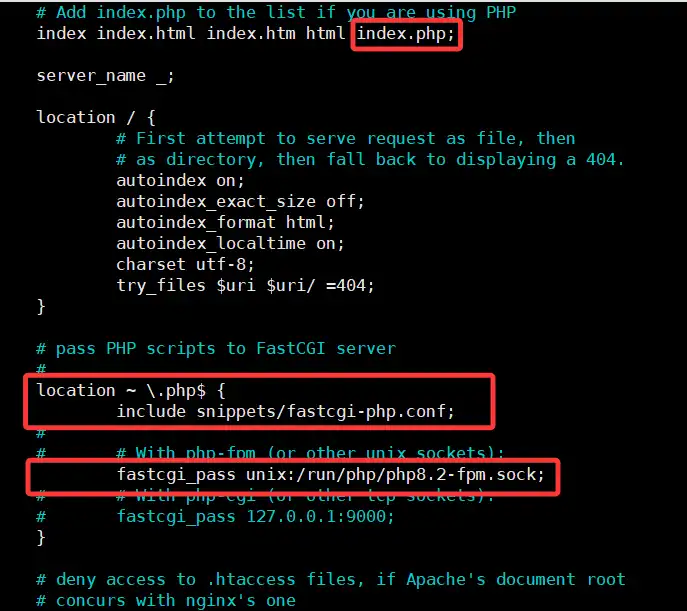
见图中加红框处。
nginx -t #测试配置是否正确,出错会有提示。
systemctl restart nginx #重启nginx服务。
https配置
1
2
3
4
5
6
7
8
9
10
11
12
| server {
listen 443 ssl;
server_name localhost;
ssl_certificate /path/to/server.crt;
ssl_certificate_key /path/to/server.key;
location / {
root /var/www/html;
index index.html;
}
}
|
https+php:
1
2
3
4
5
6
7
8
9
10
11
12
13
14
15
16
17
18
19
20
| server {
listen 443 ssl;
server_name localhost;
ssl_certificate /etc/nginx/ssl/_.qs100371.top.crt;
ssl_certificate_key /etc/nginx/ssl/_.qs100371.top.key;
root /var/www/html;
index index.php index.html index.htm index.nginx-debian.html;
location / {
try_files $uri $uri/ =404;
}
location ~ \.php$ {
fastcgi_pass 127.0.0.1:9000;
fastcgi_index index.php;
fastcgi_param SCRIPT_FILENAME $document_root$fastcgi_script_name;
include fastcgi_params;
}
}
|
其实这是LNMP服务的一部分,在前文安装wordpress有记录。
