各个宽带运营商都有 IPTV 业务,不用安装有线电视就可以高清无卡顿的看电视。没有开通 iptv 可以使用抓取的直播源地址,复制到电脑、手机、电视网络盒子等设备上看,如果动手能力强也可以自己抓包获取直播源(不会)。
项目地址:xisohi/CHINA-IPTV
提供了各省联通,移动,电信的IPTV单播和组播地址。
这里只使用单播地址。
直播源地址是txt格式,部分软件可以直接使用,转成m3u格式兼容性更好。
下载txt
地址前加上https://gh-proxy.com/即可不用梯子直接下载。
比如河北移动 https://github.com/xisohi/CHINA-IPTV/blob/main/Unicast/hebei/mobile.txt ,加上前缀之后可直接点击打开 https://gh-proxy.com/https://github.com/xisohi/CHINA-IPTV/blob/main/Unicast/hebei/mobile.txt ,txt会在浏览器中打开,全选复制,粘贴到文本文件中,保存。
河北联通 https://gh-proxy.com/https://github.com/xisohi/CHINA-IPTV/blob/main/Unicast/hebei/unicom.txt
河北电信 https://gh-proxy.com/https://github.com/xisohi/CHINA-IPTV/blob/main/Unicast/hebei/telecom.txt
各省地址把拼音换一下就可以,不过有的是空的。
txt转m3u
项目提供了一个html转换工具。
为方便使用,这里贴出全文:
1
2
3
4
5
6
7
8
9
10
11
12
13
14
15
16
17
18
19
20
21
22
23
24
25
26
27
28
29
30
31
32
33
34
35
36
37
38
39
40
41
42
43
44
45
46
47
48
49
50
51
52
53
54
55
56
57
58
59
60
61
62
63
64
65
66
67
68
69
70
71
72
73
74
75
76
77
78
79
80
81
82
83
84
85
86
87
88
89
90
91
92
93
94
95
96
97
98
99
100
101
102
103
104
105
106
107
108
109
110
111
112
113
114
115
116
117
118
119
120
121
122
123
124
125
126
127
128
129
130
131
132
133
134
135
136
137
138
139
140
141
142
143
144
145
146
147
148
149
150
151
152
153
154
155
156
157
158
159
160
161
|
<!DOCTYPE html>
<html lang="zh">
<head>
    <meta charset="UTF-8">
    <meta name="viewport" content="width=device-width, initial-scale=1.0">
    <title>直播源格式转换器</title>
    <script src="https://cdn.tailwindcss.com"></script>
</head>
<body class="bg-gray-100 min-h-screen flex items-center justify-center">
<div class="bg-white p-8 rounded-lg shadow-md w-full max-w-md">
    <h1 class="text-2xl font-bold mb-6 text-center">直播源格式转换器</h1>

    <div class="mb-8">
        <h2 class="text-xl font-semibold mb-4">M3U 转 TXT(可选项:保留分组信息)</h2>
        <form id="m3u-to-txt-form" class="space-y-4">
            <input type="file" id="m3u-file" accept=".m3u" required class="w-full p-2 border rounded">
            <div class="flex items-center">
                <input type="checkbox" id="keep-groups-m3u" class="form-checkbox h-5 w-5 text-blue-600">
                <label for="keep-groups-m3u" class="ml-2">保留分组信息</label>
            </div>
            <button type="submit" class="w-full bg-blue-500 text-white py-2 rounded hover:bg-blue-600 transition duration-200">转换</button>
        </form>
    </div>

    <div>
        <h2 class="text-xl font-semibold mb-4">TXT 转 M3U(可选项:保留分组信息)</h2>
        <form id="txt-to-m3u-form" class="space-y-4">
            <input type="file" id="txt-file" accept=".txt" required class="w-full p-2 border rounded">
            <input type="text" id="epg-url" placeholder="EPG URL (可选,默认为 https://epg.112114.xyz/pp.xml)" class="w-full p-2 border rounded">
            <div class="flex items-center">
                <input type="checkbox" id="keep-groups-txt" class="form-checkbox h-5 w-5 text-green-600">
                <label for="keep-groups-txt" class="ml-2">保留分组信息</label>
            </div>
            <button type="submit" class="w-full bg-green-500 text-white py-2 rounded hover:bg-green-600 transition duration-200">转换</button>
        </form>
    </div>
</div>

<script>
    function parseM3UToTXT(m3uContent, keepGroups) {
        const lines = m3uContent.split('\n');
        const channels = {};
        let currentGroup = '未分组';

        for (let i = 0; i < lines.length; i++) {
            const line = lines[i].trim();
            if (line.startsWith('#EXTINF:-1')) {
                const groupMatch = line.match(/group-title="([^"]*)"/);
                const nameMatch = line.match(/tvg-name="([^"]*)"/);
                const group = groupMatch ? groupMatch[1] : currentGroup;
                const name = nameMatch ? nameMatch[1] : line.split(',').pop();
                const url = lines[i + 1] ? lines[i + 1].trim() : '';

                if (!channels[group]) {
                    channels[group] = [];
                }
                channels[group].push(`${name},${url}`);
                currentGroup = group;
            }
        }

        let txtContent = '';
        if (keepGroups) {
            for (const [group, channelList] of Object.entries(channels)) {
                txtContent += `${group},#genre#\n`;
                txtContent += channelList.join('\n') + '\n';
            }
        } else {
            for (const [group, channelList] of Object.entries(channels)) {
                txtContent += channelList.join('\n') + '\n';
            }
        }

        return txtContent;
    }

    function convertTXTToM3U(txtContent, epgUrl, keepGroups) {
        const defaultEpgUrl = "https://epg.112114.xyz/pp.xml";
        const lines = txtContent.split('\n');
        let m3uContent = `#EXTM3U x-tvg-url="${epgUrl || defaultEpgUrl}"\n`;
        let currentGenre = '未分类';

        for (const line of lines) {
            const trimmedLine = line.trim();
                            if (trimmedLine.endsWith(',#genre#')) {
                currentGenre = trimmedLine.replace(',#genre#', '');
            } else if (trimmedLine && !trimmedLine.startsWith('#')) {
                const [channelName, channelUrl] = trimmedLine.split(',');
                const tvgLogo = `https://epg.112114.xyz/logo/${channelName}.png`;
                if (keepGroups) {
                    m3uContent += `#EXTINF:-1 group-title="${currentGenre}" tvg-name="${channelName}" tvg-logo="${tvgLogo}" epg-url="${epgUrl || defaultEpgUrl}",${channelName}\n`;
                } else {
                    m3uContent += `#EXTINF:-1 tvg-name="${channelName}" tvg-logo="${tvgLogo}" epg-url="${epgUrl || defaultEpgUrl}",${channelName}\n`;
                }
                m3uContent += `${channelUrl}\n`;
            }
        }

        return m3uContent;
    }

    function downloadFile(content, filename) {
        const blob = new Blob([content], { type: 'text/plain' });
        const url = URL.createObjectURL(blob);
        const a = document.createElement('a');
        a.href = url;
        a.download = filename;
        document.body.appendChild(a);
        a.click();
        document.body.removeChild(a);
        URL.revokeObjectURL(url);
    }

    function getCurrentDateTime() {
        const now = new Date();
        return now.getFullYear() +
               ('0' + (now.getMonth() + 1)).slice(-2) +
               ('0' + now.getDate()).slice(-2) +
               ('0' + now.getHours()).slice(-2) +
               ('0' + now.getMinutes()).slice(-2) +
               ('0' + now.getSeconds()).slice(-2);
    }

    function getFileNameWithoutExtension(filename) {
        return filename.split('.').slice(0, -1).join('.');
    }

    document.getElementById('m3u-to-txt-form').addEventListener('submit', function(e) {
        e.preventDefault();
        const file = document.getElementById('m3u-file').files[0];
        const reader = new FileReader();
        const keepGroups = document.getElementById('keep-groups-m3u').checked;
        reader.onload = function(e) {
            const m3uContent = e.target.result;
            const txtContent = parseM3UToTXT(m3uContent, keepGroups);
            const originalName = getFileNameWithoutExtension(file.name);
            const newFileName = `${originalName}_${getCurrentDateTime()}.txt`;
            downloadFile(txtContent, newFileName);
        };
        reader.readAsText(file);
    });

    document.getElementById('txt-to-m3u-form').addEventListener('submit', function(e) {
        e.preventDefault();
        const file = document.getElementById('txt-file').files[0];
        const epgUrl = document.getElementById('epg-url').value.trim() || "https://epg.112114.xyz/pp.xml";
        const reader = new FileReader();
        const keepGroups = document.getElementById('keep-groups-txt').checked;
        reader.onload = function(e) {
            const txtContent = e.target.result;
            const m3uContent = convertTXTToM3U(txtContent, epgUrl, keepGroups);
            const originalName = getFileNameWithoutExtension(file.name);
            const newFileName = `${originalName}_${getCurrentDateTime()}.m3u`;
            downloadFile(m3uContent, newFileName);
        };
        reader.readAsText(file);
    });
</script>
</body>
</html>
|
复制后保存到html文件,打开:
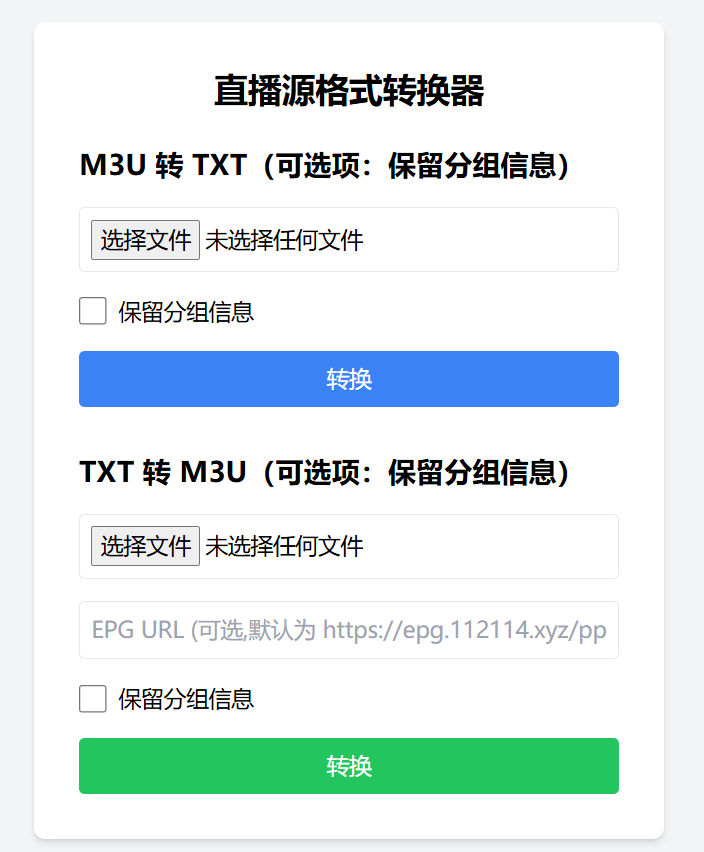
勾选保留分组信息,打开前文的txt文件,可得到m3u文件。可用potplayer直接打开播放。
放到web上可供手机,电视使用。
河北移动可用:https://api.qs100371.top/mobile.m3u
咪咕视频(全国通用):http://f.qs100371.top:7009
现在正是世界杯期间,稳定的IPTV源很重要,之前的migu_video项目也可以流畅观看。