前文已把抠图应用web化,本文实现github action打包成docker镜像并推送到ghcr.io。
目录结构
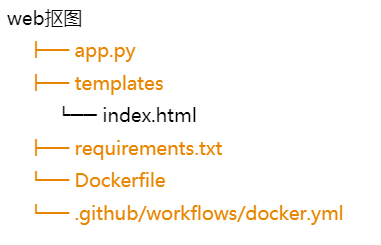
requirements.txt:
Dockerfile:
1
2
3
4
5
6
7
8
9
10
11
12
13
14
15
16
17
18
19
20
21
22
23
24
25
26
| FROM python:3.12-slim
ENV TZ=Asia/Shanghai
WORKDIR /app
COPY requirements.txt .
RUN pip install --no-cache-dir -r requirements.txt
COPY app.py .
COPY templates ./templates
RUN apt-get update && apt-get install -y --no-install-recommends wget && \
rm -rf /var/lib/apt/lists/* && \
mkdir -p /root/.u2net && \
wget -O /root/.u2net/u2net.onnx \
https://github.com/danielgatis/rembg/releases/download/v0.0.0/u2net.onnx
EXPOSE 5000
CMD ["python", "app.py"]
|
docker.yml:
1
2
3
4
5
6
7
8
9
10
11
12
13
14
15
16
17
18
19
20
21
22
23
24
25
26
27
28
29
30
| name: Build and Push Docker Image
on:
push:
branches: [ "main" ]
jobs:
build-and-push:
runs-on: ubuntu-latest
permissions:
contents: read
packages: write
steps:
- name: Checkout
uses: actions/checkout@v4
- name: Log in to GHCR
uses: docker/login-action@v3
with:
registry: ghcr.io
username: ${{ github.actor }}
password: ${{ secrets.GITHUB_TOKEN }}
- name: Build and push
uses: docker/build-push-action@v6
with:
context: .
push: true
tags: ghcr.io/${{ github.repository }}:latest
|
推送到github
到gitbub.com建一个名为cutout-web的空仓库。
1
2
3
4
5
| git init
git add .
git commit -m "first"
git remote add origin https://github.com/你的用户名/cutout-web.git
git push -u origin main --force
|
github action会在推送完成后自动打包,并上传到ghcr.io/你的用户名/cutout-web:latest
默认生成的amd64镜像。
使用方法
1
2
| docker pull ghcr.io/你的用户名/cutout-web:latest
docker run -d -p 5000:5000 --name cutout ghcr.io/你的用户名/cutout-web:latest
|
浏览器打开 http://127.0.0.1:5000 就能用。
ghcr.io有时候很慢,可以加代理:
docker pull ghcr.chenby.cn/你的用户名/cutout-web:latest
之后再:
docker tag ghcr.chenby.cn/你的用户名/cutout-web:latest ghcr.io/你的用户名/cutout-web:latest
ghcr镜像默认私有,要去仓库的 Packages 设置里改成 Public。
镜像体积:
加上模型和 onnxruntime,最终下载的镜像888M。
此项目已开源:https://github.com/qs100371/cutout-web
docker镜像地址:ghcr.io/qs100371/couout-web:latest